![download.png]](https://support.yaktrak.com.au/hs-fs/hubfs/download.png?height=40&name=download.png)
As a leader, you can choose to activate the user yourself or resend their welcome email/invitation and get the user to login, which will activate their profile.
IMPORTANT : Please note this process is only applicable to non SSO clients. As SSO users will be able to login to their profile or activate profile once their internal IT team has authorised access to YakTrak Application via OKTA or Entra ID (whichever IAM platform your organisation uses)
How do I activate new members profile in my team?
- On your 'Team Dashboard', navigate to the 'Team Members' widget.
- Locate the member who is in "Inactive" status.
- Click the ellipses (...) across their name and select 'Activate User' from the drop down menu
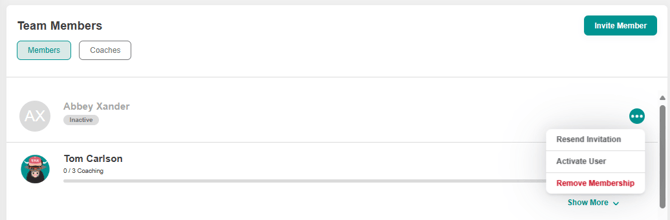
- This will activate the profile for the user.
The default password for users can be retrieved from YakTrak Suport or you can either do a password reset for the member or have them click 'Forgot Password' on the login screen.
How do I resend a welcome email to a new member in my team?
- On your 'Team Dashboard', navigate to the 'Team Members' widget.
- Locate the member who is in "Inactive" status.
- Click the ellipses (...) across their name and
- Select 'Resend Invitation' from the drop down menu.
- This will resend their activation email to the registered email
How do I activate a user (admin)
- Click 'Members' from the main menu
- Search for the team member you want to reactivate. If they dont come up, this means they are currently "Inactive" in the system.
- Click Filters from the top right hand of the screen.
- Under Status, tick the box besides "Inactive". This will bring the user on the screen.
- Click the drop down across their name.
- Click the 3 dots besides "User Hub" button
- Click 'Activate'
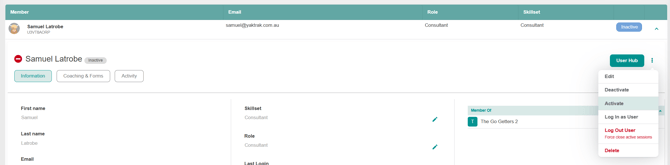
(Note that if you have deselected 'Inactive' when filtering, they will disappear from view as they are now 'Active')
- Next advise the team member that they are now active and they will need to login and set a goal.
- You may need to set their password for them.