![download.png]](https://support.yaktrak.com.au/hs-fs/hubfs/download.png?height=40&name=download.png)
How to interpret the Admin Dashboard?
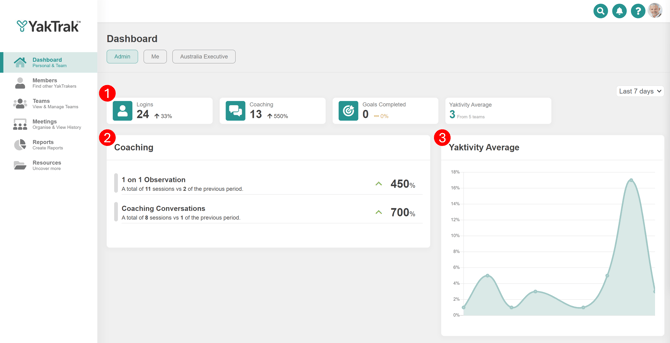
The Admin dashboard is only accessible to a client administrator. Access the dashboard by selecting 'Dashboard' from the main menu and selecting 'Admin' at the top of the page. The dashboard provides essential insights that enable you to assess important usage data for YakTrak.
1. This section provides a very high level of data:-
- Total Logins
- Total number of coaching sessions completed
- Total goals completed
- Average 'Yaktivity' or operating rhythm over a rolling three months.
All of the above can be viewed for different periods by selecting the dropdown box in the top right corner.
The smaller number in each tile is the percentage increase/decrease compared to the same period that's selected in the top right. For example 'Last 7 days' compares the last 7 days with the 7 days before.
3. Yaktivity Average provides you with a weekly overview of Yaktivity or operating rhythm to determine if consistency of rhythm is maintained over time.
The dashboard is intended to provide a high level view only. More detail of usage can be gathered in the reporting section of the main menu.