![download.png]](https://support.yaktrak.com.au/hs-fs/hubfs/download.png?height=40&name=download.png)
How do I view my team members Development Plan history?
- On your Team dashboard, navigate to 'Team Members' widget.
- Click on the ellipses "..." next to the team member you want to view the history for.
- Select 'Member Hub'.
- This will take you to the team members development hub, where you can view all the details on their skills assessment/development history.
- Navigate to the 'Coaching Plan' widget.
-
The widget label is customisable and can be renamed depending on how the clients want their Development plan named.
- Click on 'History' button.
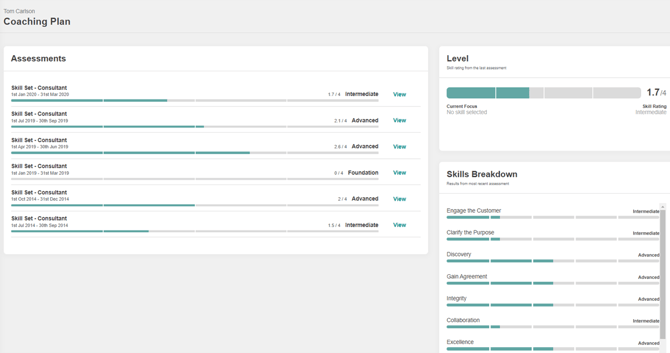
- 'Assessments' section lists all the assessment completed for the consultant along with their Mastery levels.
- Click 'View' on the 'Assessments' section next to the assessment you would like to view.
- 'Level' section - shows you the skills rating from the last assessment.
- 'Skills Breakdown' - shows you results from the most recent assessment.