![download.png]](https://support.yaktrak.com.au/hs-fs/hubfs/download.png?height=40&name=download.png)
How can I delete a coaching session?
IMPORTANT : The Delete button is accessible only if this was decided early on in the project. Its a permission that needs to be enabled on request. Typically only sr leaders or administrators have this access.
There are various reasons why you might need to remove a coaching session from a team member's coaching history. The following instructions will guide you through the process of deleting a coaching session.
**Method 1: Using Global Search or UID**
If you do have access to global search or know the UID of the session, you can locate the specific coaching session by following these steps:
- Click the 'Search' icon
 in the upper right corner of the screen.
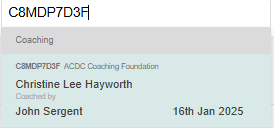
 - Enter the UID (For e.g UID: C8MDP7D3F) of the activity record you want to delete. This can be found on the top left corner of the submitted coaching form.
- This will display a dropdown menu containing the details of the session, as illustrated below.
- Select the record to open the coaching session details.
- Next, click the "Delete" button at the top of the page.
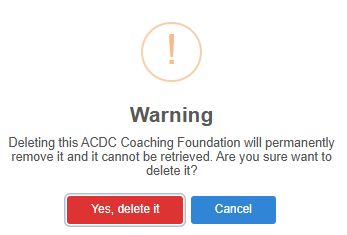
- A warning pop-up will appear; click "Yes, delete it" to confirm the deletion.
**Method 2: Deleting a Coaching Session Without Global Search Access**
If you do not have access to global search or do not know the UID of the session, and you wish to delete a coaching history for a team member, please follow the steps outlined below.
Please be aware that you are unable to delete your own coaching and forms history. This action must be performed by a leader or an administrator.
- On the "Team Dashboard," locate and click on the "Team Members" widget.
- Find the team member whose coaching session you wish to remove.
- Click the "..." (ellipsis) icon, then select the "Coaching/Form History" option from the dropdown menu.
- Choose the appropriate coaching template by navigating through the tabs located at the top of the page.
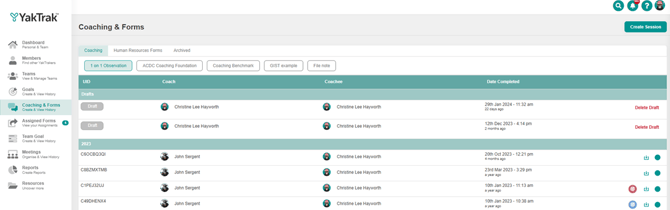
- Choose the coaching session you want to remove, which will display the session details. In the top right corner of the screen, click the 'Delete' button to proceed.

- A confirmation pop-up will appear, prompting you to verify the deletion of the session. Click 'Yes, delete it' to complete the process.
Please be aware that once a coaching session is deleted, it cannot be recovered and will be permanently erased from the member's coaching history.